What the MSP console does
MSP is the management console for partners who operate the cloud on behalf of many customers.
Register customers, hand out permissions to your staff, and check cost and status in one place.
In one sentence
MSP is where you manage customers; ODiiN is where you work on cloud resources. The two consoles have different roles.
A partner admin starts the day in MSP and moves to ODiiN only when a specific customer's resources need hands-on work.
Customer list, staff and teams, permissions, plans, cost aggregation, audit records. The management layer that decides who owns which customer.
Instances, storage, networking, security groups.
The operations layer where you inspect and act on actual cloud resources.
An MSP account does not open the customer environment directly.
When you click Go to ODiiN, the customer approves and a temporary account and session are issued, and you reach that environment only through that session.
Sessions expire and every access is logged. See How MSP and ODiiN relate for the full structure.
Who uses it
MSP is for partner staff only.
Customer contacts cannot enter this console; they use the ODiiN environment assigned to them.
| Role | Typical work | MSP access |
|---|---|---|
| OWNER | Org-wide settings, permission design, ownership transfer | Full |
| ADMIN | Customer onboarding, staff invites, plan management | Most |
| OPERATOR | Monitoring and ops response for assigned customers | Mostly read |
| VIEWER | Checking status and reports | Read only |
| Customer contact | Using their own cloud resources | None |
Roles alone are not enough. Which customers you can see is decided separately by permission sets.
How the two work together is explained in Understanding permissions.
What you can do here
The chapters in the left sidebar are effectively the feature list of this console.
- Customer onboardingReview a signup request or register the customer directly, then verify cloud account linking.
- Staff and team managementInvite staff, group them into teams, then scope which customers they cover with permission sets.
- Customer operations monitoringWatch resource status across all customers and enter ODiiN when needed.
- Cost managementAggregate cost per customer and spot abnormal increases.
- Plan managementCreate and activate the plans you assign to customers.
- Service status checksJudge whether it is a cloud outage or a problem on our side.
- Audit and tracingCheck the record of who changed what, and when.
What you don't do here
The following happens in ODiiN, not MSP. If you can't find a menu, you may be looking at the wrong console.
Creating and stopping instances, managing storage volumes, editing security group rules, configuring networks, tagging resources, running automated actions.
MSP only aggregates and displays the results of that work — it does not run it.
Screen layout
Signing in opens the dashboard first. The left menu splits into three areas by what it manages.
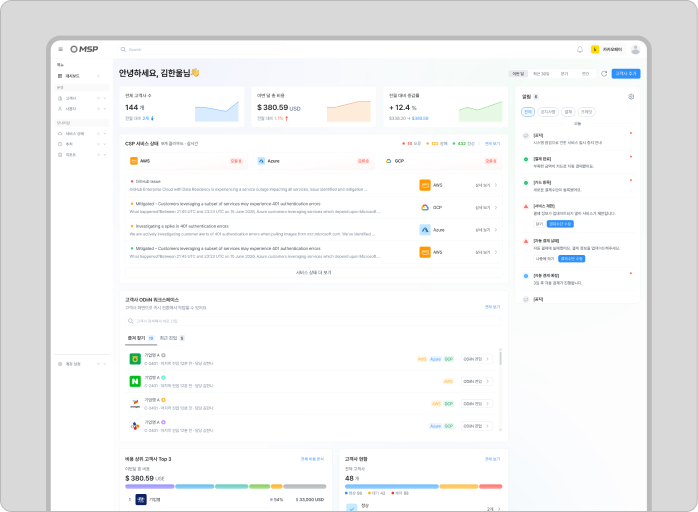
The menus you see differ per person. Menus you lack permission for are not greyed out — they are hidden entirely.
For a walkthrough of every screen, see Tour of the screens.
What to read next
The chapters in the left sidebar are effectively the feature list of this console.
- 1Understand the structure first
How MSP and ODiiN connect, and where customer data comes from. → How MSP and ODiiN relate
- 2Get your account ready
Create an account from the invite mail and sign in. → Create an account from an invite
- 3Check your permissions
Knowing what your account can do makes every later page much easier. → Understand your role and permissions first
Frequently asked questions
MSP is for partner staff only.
Customer contacts cannot enter this console; they use the ODiiN environment assigned to them.